"A human being should be able to change a diaper, plan an invasion, butcher a hog, conn a ship, design a building, write a sonnet, balance accounts, build a wall, set a bone, comfort the dying, take orders, give orders, cooperate, act alone, solve equations, analyze a new problem, pitch manure, program a computer, cook a tasty meal, fight efficiently, die gallantly. Specialization is for insects." (Robert A. Heinlein)
Showing posts with label Photo-Recovery. Show all posts

Friday, 20 January 2012

Recovering photos from a damaged SD Card (again)

It happened again! I suppose it's because of some hardware problem but my old Sempron 2400, every now and then, makes unreadable a SD card while I'm reading it. This time the damage had been particularly nasty since the recovery method I usually apply (using foremost command) only recovered a handful of of files before stopping because of a “write error”. I so tried another recovery program: Photorec.

Installation and recovery

Photorec is part of the Testdisk disk recovery package it can be installed form Ubuntu's software centre or with apt-get command
sudo apt-get install testdisk
once installed Photorec can be executed by command line
sudo photorec
Photorec has a simple but effective character interface with a wizard-like organization: at first I've been asked for the device to recover
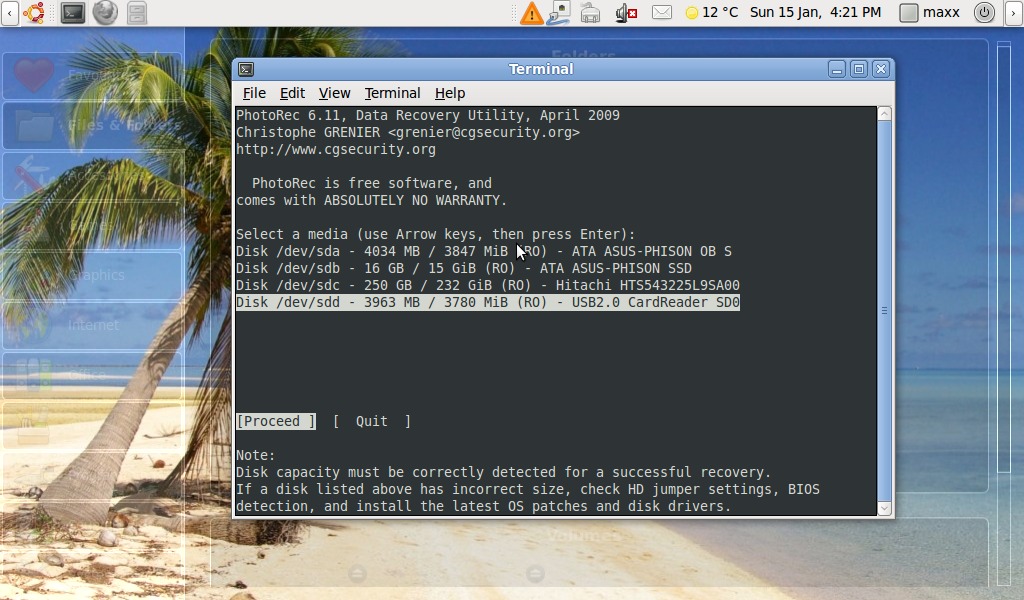
then the partition type, I selected “Intel

Saturday, 12 December 2009

Recovering accidentally deleted photos using Linux

I suppose it happened almost everybody to have some digital photo accidentally deleted from a memory card. It happened to me some days ago, after a power failure, I discovered the photos I was moving from the camera already had disappeared from the memory card but never had been saved on the hard disk.

The undelete process

The memory card, fortunately, did no suffer any damage during the power failure. Following instructions on this Ubuntu community documentation page I installed foremost:
sudo apt-get install foremost
then I executed it
sudo foremost -i /dev/sdc1 -o /recovery/foremost
/dev/sdc1” is the card reader device .
The program extracted all previously deleted in the output directory all neatly separated, by file type, in different folders.